

 Ritesh Agarwal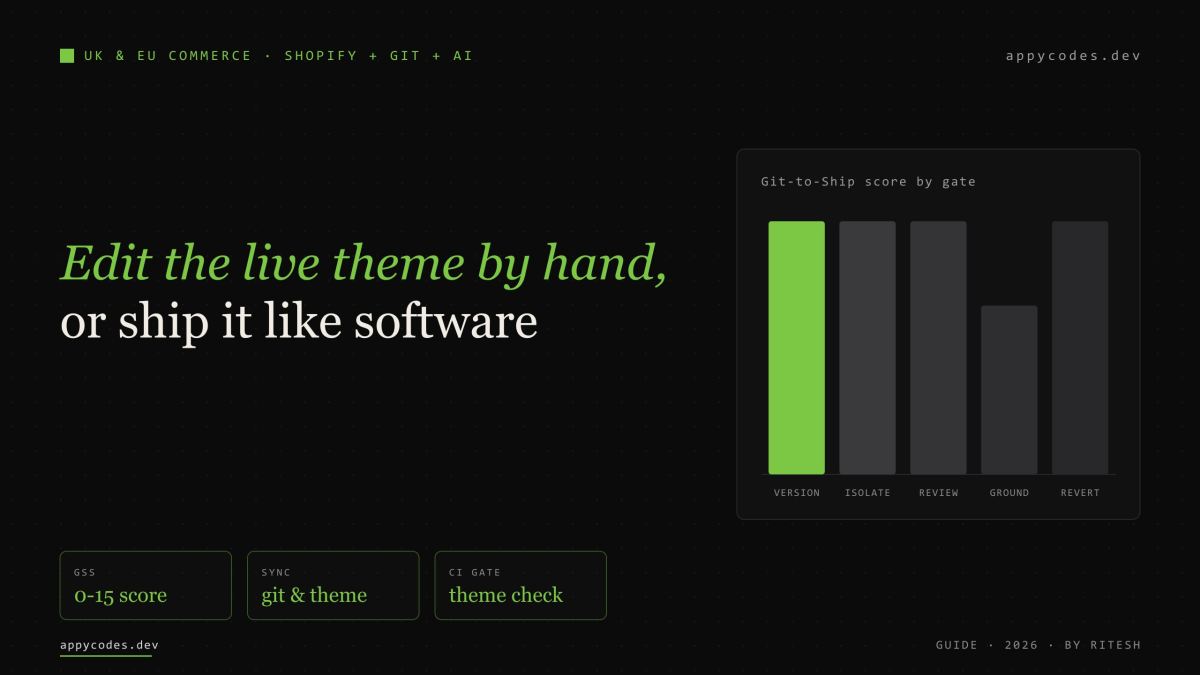
Direct answer
Put the theme in Git, connect the branch to Shopify, and let an AI coding agent work the repository—never the live theme editor. A premade theme (Dawn and the Online Store 2.0 themes) and a fully custom one connect the same way. Shopify’s GitHub integration keeps a branch and a theme in two-way sync; the agent edits Liquid, JSON templates, JavaScript and CSS on a feature branch wired to an unpublished preview theme; Theme Check and a human review the pull request; merging to the branch the live theme mirrors is the deploy, and reverting that commit is the rollback. Features, bug fixes, SEO and GEO all ship through the same reviewed, reversible path.
Key takeaways
- Any theme—stock Dawn, bought or fully custom—connects to Git the same way.
- The Shopify GitHub app syncs a branch and a theme in both directions.
- Develop on an unpublished preview theme; never hand-edit the live one.
- A pull request with Theme Check is the review gate, not “it looks fine”.
- Publishing is a commit; rollback is a revert—no work stranded in a browser.
- SEO and GEO are code changes, so they get the same review and history.
What connects to what
Three things join up, and each keeps its own job. Git is the source of truth for the theme’s files. Shopify renders those files as the storefront and owns the data—products, prices, inventory, customers. An AI coding agent such as Claude Code or Codex reads and edits the repository the way a developer would. The mistake most stores make is skipping the middle layer entirely: editing Liquid in the admin code editor, on the live theme, with no history and no review. That is the habit this workflow removes.
Shopify’s GitHub integration is the join. You connect a theme to a repository and branch, and from then on the branch and the theme stay equal: commits to the branch update the theme in the admin, and edits saved in the admin are committed back to the branch. A theme connected this way shows its repository, branch and last commit time on the theme card, and if it drifts you can pull the branch back with Actions → Reset to last commit. A published theme connected to a branch updates the live storefront when commits land on it. Shopify: GitHub integration for themes
Locally, the Shopify CLI gives the agent the same tools a person uses: shopify theme dev starts a hot-reloading local preview against a real store, shopify theme check lints the Liquid and theme structure, andshopify theme pull/push move files to and from an unpublished theme. None of that needs Shopify Plus, and it applies whether you started from Dawn or built every section from scratch. Shopify: CLI for themes
- Changes go straight onto a theme, often the live one
- No history, no diff, no review before shoppers see it
- “Undo” is whatever you can remember to retype
- Two people editing overwrite each other silently
- Every change is a commit on a branch, with an author
- Theme Check and a human review the diff in a pull request
- Rollback is a revert or Reset to last commit
- An agent, a contractor and staff all work the same safe path
The two-way loop, drawn out
The important detail is that preview and live are two different themes. Feature work runs on an unpublished theme connected to a feature branch; the merchant, a reviewer or a client can open its preview URL and see the change against real products and prices without any risk to the storefront. Only when the pull request is reviewed and merged into the branch the published theme mirrors does the change reach shoppers—and because that is a single commit, undoing it is a single revert. This is what lets the agent move quickly: fast is safe when every step is isolated and reversible.
How Appycodes uses this for UK & EU stores
We run this workflow for UK and EU Shopify merchants across very different catalogues. Two anonymised examples show the range—both are custom engineering on Shopify, kept in Git, worked through previews and reviewed pull requests rather than the admin code editor.
For a UK caravan, motorhome and campervan parts retailer we rebuilt an existing storefront as a custom Dawn-based Online Store 2.0 theme—bespoke sections, a trust strip, breadcrumbs and a sticky mobile buy bar—kept in Git and driven with the Shopify CLI. Every section stays editable in the customiser after launch.
Lesson: “custom” and “editable by the merchant” are not opposites when the theme is sections-based and versioned.For a French certified-organic beauty brand on a custom Liquid theme we built a real customer-account dashboard, gift-with-purchase over a spend threshold and custom cart logic—things the platform does not offer out of the box—then ran a performance pass (deferred JavaScript, lazy-loaded media, explicit image dimensions, a removed heavy plugin).
Lesson: the differentiated work lives in code; version control is what makes shipping it repeatedly low-risk.Product, Organization, WebSite and BreadcrumbList JSON-LD is written and extended in theme snippets, validated, and changed through pull requests—not left to whatever an app happens to emit. That is the same substrate SEO and GEO both depend on.
Lesson: if a search or AI surface reads it, it deserves a diff and a review.A short conventions file in the repo tells the agent the brand tokens, the section structure, the “never touch” list and the branch-preview-check-review loop. It plans, edits Liquid and assets, previews, and opens a PR; a human still reads every diff before it reaches the live branch.
Lesson: speed comes from grounding and guardrails, not from letting a model run unattended.The Git-to-Ship Score
Before we let anyone—person or agent—move fast on a theme, we check five gates. Score each 0 when absent, 1 when partly there, 2 when configured, and 3 when proven on a real change. This is operational readiness, not a Shopify certification: a store can be live and still score badly here, which is exactly when a “quick fix” becomes an outage.
Theme is a Git branch; no unversioned admin edits
Work on a preview/dev theme, never the published one
PR + Theme Check + a human reads the diff
Agent has a conventions file: tokens, structure, don’t-touch
Publish is a commit; revert or Reset to last commit restores it
Grounding the agent
The difference between an agent that helps and one that creates cleanup is almost entirely context. A short conventions file—CLAUDE.md for Claude Code, AGENTS.md for Codex—teaches it the repository the way you would brief a new developer: the stack, the brand tokens, the files it must not rewrite, and the branch → preview → check → review loop it has to follow.
# CLAUDE.md  (Codex reads AGENTS.md — keep one file, symlink the other)
# The repository conventions the agent must follow. This is what turns a
# generic model into an engineer who edits like the rest of the team.

## Never
- Edit the live theme in the Shopify admin code editor.
- Rewrite config/settings_data.json — it holds the merchant's own
  customiser choices. Flag any change to it in the PR instead.
- Hard-code brand colours or fonts. Tokens live in assets/brand.css.

## Stack
- Dawn-based Online Store 2.0 theme: sections + JSON templates, so every
  page stays editable in the customiser after we ship.
- Product / Offer / BreadcrumbList JSON-LD lives in snippets/*. Keep it valid.

## Every change
- New branch. `shopify theme dev` to preview against the store.
- `shopify theme check` must pass before you commit.
- Open a pull request. A human reads the diff before it reaches main.
One pipeline, four kinds of change
The point of a version-controlled theme is that every kind of change uses the same road. A new section, a checkout bug fix, an SEO title rewrite and a GEO structured-data improvement all enter as a branch, get a preview, pass Theme Check, get read by a human, and merge as one commit. There is no separate, riskier path for “small” SEO edits made directly in the admin—the class of change that quietly breaks canonical tags or JSON-LD on a Friday afternoon.
Continuous integration is what makes review affordable at speed. A single GitHub Actions workflow runs Theme Check on every pull request, so Liquid errors, deprecated filters and accessibility problems fail the merge instead of reaching the store. It needs no store credentials, because Theme Check only reads the files in the repository; a separate, credentialed step can deploy to a preview theme when you want one. Shopify: use the CLI in a CI/CD pipeline · Shopify: Lighthouse CI action
# .github/workflows/theme.yml
# Runs on every pull request to main. No store credentials required:
# Theme Check only reads the theme files already in the repository.
name: theme
on:
  pull_request:
    branches: [main]

jobs:
  check:
    runs-on: ubuntu-latest
    steps:
      - uses: actions/checkout@v4
      - uses: actions/setup-node@v4
        with:
          node-version: "20"
      - run: npm install -g @shopify/cli
      # Lints Liquid and flags theme, performance and accessibility issues.
      # --fail-level error blocks the merge when a real problem is found.
      - run: shopify theme check --fail-level error
SEO and GEO ship the same reviewed way
A Shopify theme renders on the server, so the words, headings and structured data you ship in Liquid are in the HTML that both Google and AI answer engines read. That makes the theme the right place to control search and generative visibility—and the Git workflow the right way to change it without regressions.
For classic SEO the levers are familiar: accurate title and description logic, one clear H1 per template, clean internal linking, and complete structured data. Shopify’s themes emit a Product JSON-LD via the structured_data filter, but its default output is deliberately minimal—name, price, availability—so fields like brand, SKU, GTIN, images and shipping usually need adding in theme code, and Google recommends the OnlineStore subtype of Organization for a shop. Treating that JSON-LD as reviewed snippets, validated in CI, is how it stays correct as the catalogue changes. Shopify: ecommerce schema and structured data
GEO—generative engine optimization—extends the same idea to AI answer engines and shopping agents: Google’s AI Overviews and AI Mode, ChatGPT, Gemini and Copilot increasingly read storefronts and summarise or recommend products directly. Shopify has reported AI-referred traffic and AI-attributed orders rising sharply, and has been rolling out agent-facing discovery for eligible merchants. The durable levers are the ones you already control in the theme: complete, valid structured data; genuine, server-rendered product copy; correct hreflang and market handling for the UK and EU; and fast, accessible pages. Shopify: agentic commerce momentum
Recommendations for UK & EU merchants
Keep merchandising in the theme editor; route every code change through a branch and a preview. You get history and rollback immediately, and the theme stays fully editable.
Run Theme Check and Lighthouse CI on every PR so a large catalogue can’t silently regress. Script bulk metafield and section work, but review the diff before it merges.
Use the agent for what Shopify can’t do natively—custom cart, account dashboards, gift-with-purchase—while keeping hreflang, Markets and cookie consent correct across every locale.
A shared branch → preview → check → review loop lets any engineer or agent ship safely across many stores. Publishing is a commit; a rollback is a revert.
After many UK and EU Shopify engagements, our advice is unglamorous: connect the theme to Git first, make the preview theme and the pull request non-negotiable, and only then turn up the speed with an AI agent. The leverage is real—an agent that is properly grounded ships features, fixes, SEO and GEO in hours instead of days—but it comes from the discipline around it, not from the model. That is the same standard we apply in our custom Shopify development and performance and search work.
Frequently asked questions
- Can I connect a premade Shopify theme like Dawn to Git, or only a custom one?
- Both. A theme's files can live in a Git repository whether they are stock Dawn, a bought theme or a fully custom build. Shopify's GitHub integration connects the same way in every case: add a theme, connect it to a repository and branch, and the branch and the theme stay in sync from then on.
- Does connecting a theme to GitHub overwrite the merchant's changes in the theme editor?
- No. The sync is two-way. Edits made in the Shopify admin are committed back to the connected branch, and commits to the branch update the theme, so the two always match. Treat config/settings_data.json, which stores the merchant's customiser choices, as a reviewed file rather than one an agent rewrites freely.
- Is it safe to let an AI coding agent change a live Shopify store?
- Only if the agent works the repository, never the live theme editor. On a feature branch wired to an unpublished preview theme, behind Theme Check and a reviewed pull request, an agent's change is as safe and reversible as any engineer's commit. The live storefront only ever mirrors a reviewed commit on the connected branch.
- What is GEO for a Shopify store, and how is it different from SEO?
- GEO, generative engine optimization, is making your store legible to AI answer engines and shopping agents so they find it and represent it correctly. It leans on the same server-rendered content and structured data as classic SEO, with one extra bar: accuracy, because an agent quotes your price, availability and policies directly to a shopper.
- Do I need Shopify Plus for this workflow?
- No. The GitHub integration, the Shopify CLI and Theme Check all work on standard Shopify plans. The workflow is about version control, isolated previews and code review, not a plan tier.
Primary sources
- Shopify: GitHub integration for themes
- Shopify CLI: theme commands
- Shopify: CLI for themes
- Shopify: Theme Check
- Shopify: use the CLI in a CI/CD pipeline
- Shopify: ecommerce schema and structured data
- Shopify: agentic commerce momentum
Technical and operational guidance, not legal or commercial advice. Confirm current Shopify features, plan requirements and agent-program availability for UK and EU merchants before relying on them.
UK topic cluster
Payments & ecommerce
UK and EU checkout, payments, fulfilment and storefront engineering decisions.
Related guide
Shopify Functions for custom pricing
B2B tiers, volume discounts and member rates built on Shopify Functions.
Case study
EU beauty brand on Shopify
A custom Liquid theme with a real account dashboard, gift-with-purchase and a performance pass.