


TL;DR
If your app depends on Supabase and serves users in India, do not wait for Jio to fix it upstream. Stop calling supabase.co from the client. Route through your own subdomain on Cloudflare, or proxy through your backend.
If you're stuck on an AI-built Lovable / Bolt / v0 prototype that's now failing on Jio, this is exactly the shape of work we do under Supabase production hardening.
What exactly is happening
On affected Jio networks, the Supabase project domain either does not resolve correctly or resolves to an unreachable IP address. When you run a DNS lookup, the response may fail outright or return inconsistent results between requests.
In the browser console, developers usually see one of three error shapes:
Failed to Fetchon REST queries (supabase.from("...").select()calls)WebSocket Connection Failedon Realtime subscriptions- Connection timeouts on
supabase.auth.signIn()andsupabase.auth.getSession()
Switching the same device to Airtel, office WiFi, or a VPN restores connectivity immediately. That confirms the issue is ISP-level filtering or routing, not your app, not Supabase. The quickest diagnostic is a single command:
nslookup your-project.supabase.coOn Airtel you get an IP back. On affected Jio connections you get nothing, a timeout, or an IP that no traffic can reach.
Why this matters
Jio carries hundreds of millions of users in India. If your Supabase-backed app is broken for them, you don't have a small bug, you have a market-segment outage. Waiting for an ISP-level resolution is not a strategy. The fix is in your routing path.
Solution 1: Route Supabase through your own domain via Cloudflare
This is the cleanest production-grade fix. Instead of exposing the Supabase project URL directly in your frontend, create your own subdomain and proxy traffic through Cloudflare.
- Create a subdomain such as
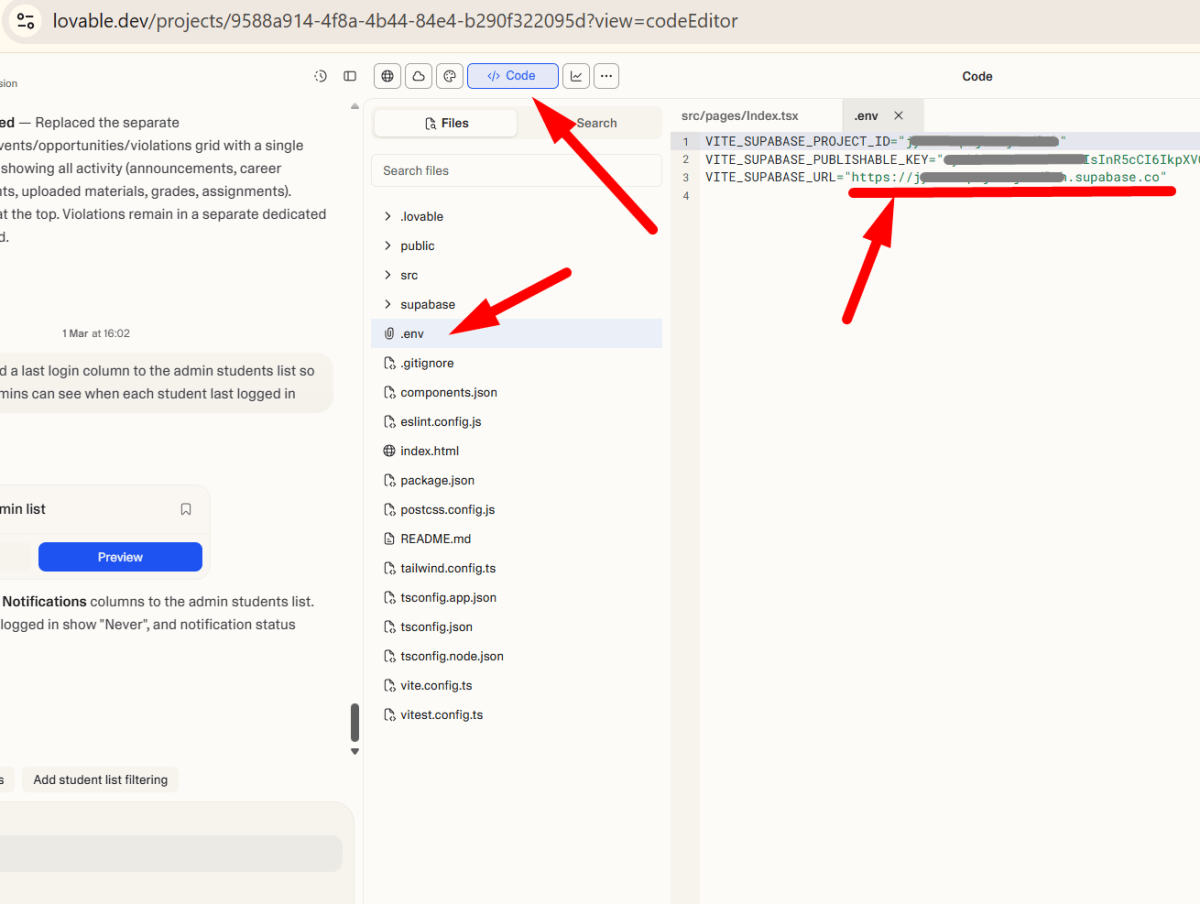
api.yourdomain.comin Cloudflare DNS. - Configure a CNAME record pointing to your Supabase project URL (
your-project.supabase.co). - Update your frontend env variable and redeploy.
VITE_SUPABASE_URL=https://your-project.supabase.coVITE_SUPABASE_URL=https://api.yourdomain.comTraffic now flows from the user to your custom domain to Cloudflare to Supabase. Since your own domain is not blocked, the app works normally on Jio connections. This is also the path we use whenever we ship multi-region Supabase apps, covered in detail under Cloudflare edge engineering.
Solution 2: Call Supabase through your backend API
The other strong fix: remove direct client-side calls to Supabase completely. Instead of the frontend talking to Supabase, route requests through your own backend API. Your server communicates with Supabase from a cloud environment where ISP restrictions don't apply.
import express from "express"
import { createClient } from "@supabase/supabase-js"

const app = express()

const supabase = createClient(
  process.env.SUPABASE_URL!,
  process.env.SUPABASE_SERVICE_ROLE_KEY!
)

app.get("/api/profile", async (req, res) => {
  const { data, error } = await supabase
    .from("profiles")
    .select("*")

  if (error) return res.status(500).json(error)
  res.json(data)
})

app.listen(3000)
This approach also improves security and gives you more control over authentication, logging, and rate limiting. It's heavier than Solution 1, you're now operating a backend tier, but it's the right move when the app is graduating from prototype to production anyway. We do this work under API & integration and SaaS web app development.
Solution 3: Change DNS server (developer-only)
For developers experiencing the issue locally, changing DNS often restores access. Switching to Google DNS or Cloudflare DNS bypasses ISP-level DNS filtering in many cases.
# Google DNS
8.8.8.8
8.8.4.4

# Cloudflare DNS
1.1.1.1
1.0.0.1# Windows
ipconfig /flushdns
# macOS
sudo dscacheutil -flushcache; sudo killall -HUP mDNSResponder
# Linux (systemd-resolved)
sudo systemd-resolve --flush-cachesReality check: this fixes your machine. You cannot ship a product that expects every Jio user in India to change their DNS settings. Treat this as a diagnostic that confirms the root cause, then ship Solution 1 or 2.
Solution 4: Use a VPN
A VPN tunnels traffic outside Jio's routing rules. If Supabase starts working the moment you enable a VPN, that's the final confirmation the problem is network-level filtering. VPN works for developers and internal teams. It is not a fix for consumer-facing production apps, for the same reason as Solution 3.
Pick the right fix
Four fixes, two of them production-grade. Use this table to pick:
| Solution | Effort | Fixes for end users? | When to use |
|---|---|---|---|
| 1. Custom domain + Cloudflare | ~30 min | Yes | Default fix for any production app |
| 2. Backend API proxy | Days to weeks | Yes | When you're graduating from prototype anyway |
| 3. Change DNS | ~2 min | No, per-device only | Developer diagnostic, not a fix |
| 4. VPN | ~1 min | No, per-device only | Confirms the diagnosis. Then ship 1 or 2. |
Final thoughts
The Jio Supabase issue is outside your application code. Waiting for ISP-level resolution leaves your app vulnerable to unpredictable outages and silently shrinks your addressable market in India. The best long-term strategy is to own your routing path using a custom domain or a backend API layer.
If you've shipped a Lovable, Bolt, or v0 prototype and your users in India are now reporting blank screens, the failure mode is almost always this. The fix is mechanical. The right fix, Solution 1, takes about thirty minutes.
Service
Supabase Development
Production-hardening Lovable / Bolt / v0 apps: RLS, indexes, backups, real auth.
Service
Cloudflare Edge Engineering
Workers, R2, WAF, redirect rules. The platform your custom domain runs on.
Service
AI App Completion
The Lovable / Bolt graduation engagement: from demo-grade to production-ready.